A prospect searches "emergency HVAC repair," clicks your Google ad, then calls. The job closes for $4,000, but in most ad accounts that campaign shows zero conversions, because the money moved offline the moment the call connected. If you live on high-intent inbound calls, that gap is the core measurement problem. Marketing attribution for phone calls connects that call back to the ad, keyword, and campaign that produced it. This guide covers how call attribution works, which models to use, and the step a lot of teams skip: feeding those offline conversions back into platform bidding.
What Is Marketing Attribution for Phone Calls?
Marketing attribution for phone calls is the practice of assigning credit for a phone conversion to the marketing touchpoints that led to it, the same way you would for a web form fill. It links an inbound call to its traffic source, campaign, keyword, and the visitor's earlier journey, turning an offline event into data you can act on.
Call attribution matters because phone leads behave differently from clicks. A caller has already decided to talk to a human, so these are often higher-intent, higher-value conversions than a form fill. Without phone call attribution, a campaign that drives expensive, high-converting calls looks worse on paper than one driving cheap clicks, and budget drifts to the wrong place. The goal is a more complete view of the customer journey across online and offline, so the channel that earned the call gets credit, though calls, CRM stages, ad clicks, and website sessions often live in different systems with imperfect identity resolution.
How Phone Call Attribution Works (Dynamic Number Insertion)
The mechanism behind most call tracking is dynamic number insertion (DNI). A small script swaps the phone number a visitor sees based on how they arrived: someone from a paid Google ad sees one number, someone from organic search or a LinkedIn campaign sees another. When the call comes in, the dialed number tells the system which source and campaign produced it; keyword-level detail depends on the ad platform, match type, privacy thresholds, and whether search-term data is available, so it may not always be reliable.
DNI reads the data already attached to the session: traffic source, UTM parameters, keywords searched, and landing page. A pool of unique numbers rotates across visitors so each session maps to a call, though accuracy depends on traffic volume, pool size, session duration, and how cookies and repeat visits are handled; an undersized pool can misattribute a call. Click-to-call works differently depending on where the tap happens: a website button, an ad's call extension or call asset, and DNI itself are related but distinct mechanisms, and the platform's call reporting setup determines which one gets credit.
On a tracked call:
- A visitor arrives from a campaign, and DNI shows them a unique tracking number tied to that session.
- They call. The call routes to your real business line, so the experience is unchanged.
- The platform logs the source, campaign, keyword, call duration, and often a recording.
Recording calls can trigger consent, notice, retention, and privacy requirements that vary by jurisdiction, which matters here since call recordings and transcripts often contain personal information.
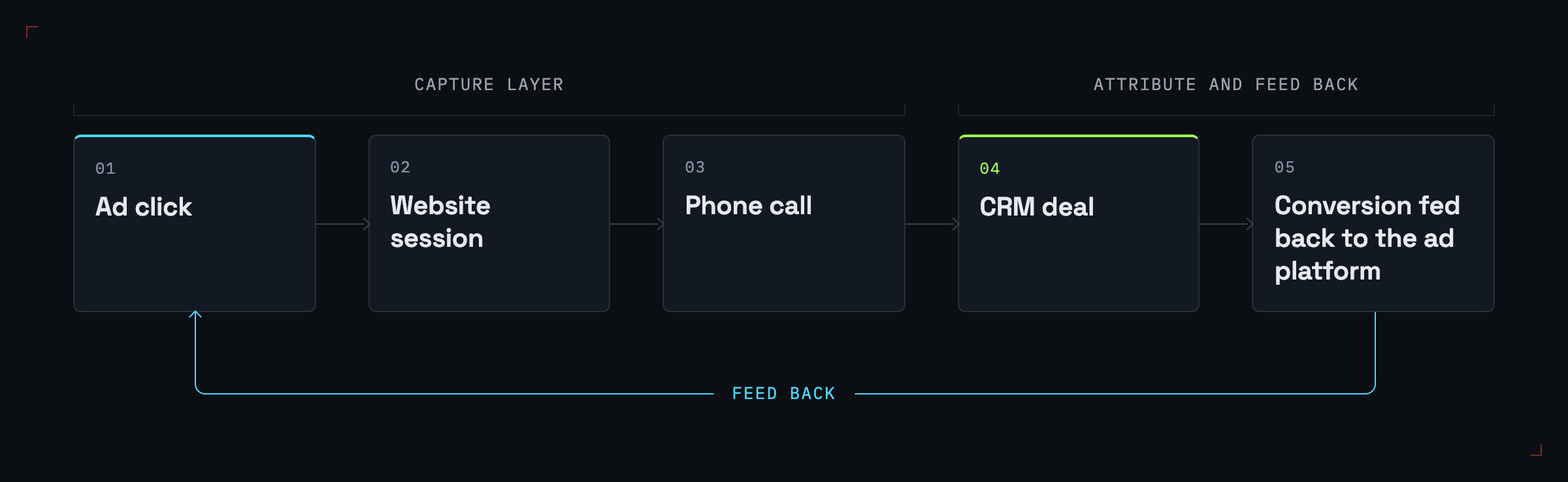
Capturing the call is what dedicated call tracking software does well. Where teams stall is everything after the call is logged, which the rest of this guide covers.
Call Attribution Models: Campaign, Session, Visitor & Multi-Touch
Once a call is captured, you still have to decide which touchpoint gets credit. Call tracking tools and ad platforms expose this at different levels of granularity, and the level you choose changes the numbers you report.
Campaign-level attribution credits the campaign that drove the call. Session-level ties the call to the specific visit that triggered it, sharper but blind to earlier visits. Visitor-level stitches a caller's sessions into one identity, so a prospect who visited three times before calling counts as one journey. Multi-touch attribution goes further, spreading credit across every observable touch. Picking a model trades simplicity against honesty about how buying actually happens.
| Model | What it credits | Best for | Limitation |
|---|---|---|---|
| Campaign-level | The campaign tied to the call | Quick channel-level ROI checks | Hides which keyword or visit drove it |
| Session-level | The single session that produced the call | Pinpointing what triggered the call | Ignores earlier research visits |
| Visitor-level | All sessions stitched to one caller | Longer, multi-visit B2B journeys | Needs reliable identity stitching |
| First-touch / last-touch | The first or final touch only | Isolating discovery vs. closing | Overcredits one moment, ignores the rest |
| Multi-touch | Every observable touch across the journey | Proving full-funnel contribution | More setup; needs cross-channel data |
For a journey with several touches before the call, multi-touch is usually the most defensible view. Platforms built for multi-touch attribution across every channel let you compare first-click, last-click, linear, time-decay, position-based, and custom-weighted models side by side, so you see how each values the call instead of committing to one story. Position-based, for instance, often gives 40% to the first touch, 40% to the last, with 20% split across the middle. Multi-touch still assigns credit rather than proving causal lift, and it can miss offline word-of-mouth, direct traffic, dark social, cross-device activity, untracked calls, and identity-stitching gaps; for large budget calls, pair it with incrementality testing, geo tests, or holdouts where feasible.
Why Phone Call Attribution Matters (Benefits & ROI)
The practical payoff is sharper budget decisions. Once you know which campaigns generate call conversions and what those calls are worth, you can shift marketing spend toward the channels producing real revenue, not cheap clicks. Cost per acquisition stops being a form-fill vanity number and reflects actual pipeline.
Call attribution also surfaces higher-quality leads. A caller sits further down the funnel than a casual browser, so attributing calls often reveals that a "low-volume" campaign is quietly driving your best business. That visibility aligns sales and marketing around one record of which digital marketing efforts produced the calls that closed. If you're evaluating tools, our roundup of the best multi-touch attribution software is a good starting point. The limit is that capturing the call tells you the source, but it doesn't improve ad performance until that data travels back to the platforms making bidding decisions.
Closing the Loop: Offline Conversions and Server-Side / CAPI Tracking
Feeding conversions back to the platforms is where call attribution earns its keep. A logged call in a dashboard is a report; a call sent back to Google or Meta as a conversion is a signal those platforms can optimize against. Closing the loop means pushing your offline conversions, the calls that became qualified leads or closed deals, into the systems that decide how budget gets spent. In cross-channel analytics terms, the signal doesn't do much for you until it reaches the platform.
Two platform mechanisms make this possible. Google Ads offline conversion import "lets you see what happens in the offline world after someone clicks your ads", and it handles conversions that start "with an ad click or call from your ad," per the offline conversion import docs. Its upgraded path, enhanced conversions for leads, uses first-party data such as email addresses "to improve accuracy and bidding performance." How well that works in practice depends on matching quality, consent, CRM hygiene, deduplication, and upload latency.
On Meta's side, the Conversions API connects "an advertiser's marketing data (such as website events \... and offline conversions) from an advertiser's server" directly to Meta, though it doesn't bypass privacy restrictions since results still depend on consent, Meta's policies, identity matching, deduplication, and event quality. Server-side delivery matters because it can reduce, not eliminate, client-side signal loss from ATT, cookie consent rules, browser restrictions, and user opt-outs, and platform matching limits still apply.
This last mile is where we come in at Synter, and it's a different job from capturing the call. We aren't a DNI or call tracking specialist; tools like CallRail, Invoca, and Marchex own that capture layer. We sit one layer up, on attribution and conversion feedback. Our conversion sync pushes closed-won events to Google and Meta, keeping Smart Bidding fed with revenue signals rather than form fills. Our native HubSpot and Salesforce sync matches ad clicks to deals, so you attribute actual revenue rather than raw conversions. The two roles are complementary: the call tracking tool records that the call happened and where it came from, and we get that conversion attributed and returned to the platforms doing the bidding.
How to Implement Call & Offline Attribution (Tools and Stack)
A working stack has three layers, and no single tool covers all three well.
1. Capture the call. Use dedicated call attribution software such as CallRail, Invoca, or Marchex to assign tracking numbers, run DNI, and record calls. This layer answers "which source produced this call?"
2. Stitch the journey. Connect your analytics and CRM so a call becomes part of a customer journey, not an isolated event. GA4 captures web sessions, your CRM holds the deal outcome, and tools like Segment or PostHog route events between them. The job is to tie the call to the visitor's earlier touches and to the eventual sale.
3. Attribute and feed back. This is where the call conversion becomes a multi-touch credit and returns to the ad platforms. We connect your ad platforms and CRM with one-click OAuth, stitch ad clicks to website sessions to CRM deals, then upload offline and phone conversions so they can become bidding signals in Google and Meta once the receiving platform accepts and matches them; not every event is accepted or weighted equally by Smart Bidding. For a broader survey of this layer, our guide to attribution software for marketing teams compares the field.
The common mistake is stopping after layer one. A tracking number tells you the source, but it only improves performance once it reaches the bidding algorithm. Capture, stitch, then feed back.
Frequently Asked Questions
What is an example of attribution in marketing? A prospect clicks a Google search ad, returns later through a LinkedIn ad, then calls and books a demo. Under a multi-touch model, attribution splits credit for that booked call across both touches: the search ad for discovery, the LinkedIn ad for the close.
What is attribution in mobile advertising? Mobile attribution connects an action, an install, a click-to-call tap, or a purchase, back to the ad that drove it. For phone calls specifically, a click-to-call tap from a mobile ad gets matched to its campaign the same way a desktop click is.
How to attract customers on call? Run campaigns against high-intent keywords, make the phone number prominent with click-to-call on mobile, and use call attribution to double down on the campaigns already producing quality calls.
What is 50/50 attribution? It's a model that splits conversion credit evenly between two touchpoints, most often the first and last interaction, giving each 50%. It's a middle ground between last-touch and full multi-touch, though it still ignores everything between the two ends.
Conclusion
Call tracking captures the source; attribution plus conversion feedback is what turns that signal into smarter budget decisions. Capture the call alone, and you've shown where it came from but stopped one step short of acting on it, while the platforms keep optimizing on incomplete data.
The teams that win on phone leads close the loop: capture with a call tracking tool, stitch the journey through analytics and CRM, then return those conversions to the platforms doing the bidding. To attribute calls across connected channels and route offline conversions back into Google and Meta, connect your ad platforms and CRM with Synter. See current plans: SOLO is $20 per month or $200 per year, SCALE is $500 per month or $5,000 per year, and CUSTOM is sales-led.