Last updated August 2026.
If you manage Amazon ads, you already know the grind: pulling the search term report, nudging bids a few cents, adding negatives, checking whether yesterday's budget capped out by noon. Do it across a few hundred ASINs, and it stops being strategy and starts being data entry. Amazon PPC automation hands that repetitive work to software, so the bid and budget mechanics run on rules or AI while you own the account strategy. This guide walks through what automation actually does, how to set it up, where it goes wrong, and how to think about it if Amazon is one of several channels you run rather than your whole world.
What Is Amazon PPC Automation?
Amazon PPC automation is the use of software to manage the repetitive parts of pay-per-click advertising on Amazon, including bid changes, budget shifts, keyword harvesting, and negative targeting, based on rules you set or machine learning models that optimize toward a goal. Instead of a human editing campaigns by hand, the tool reads performance data and acts on it, usually many times a day.
The work it automates maps directly onto Amazon's ad products. Sponsored Products are cost-per-click ads that promote individual product listings on Amazon and select premium apps and websites, and they're often where most automation effort lands, since they typically carry a large share of search-driven spend, though that varies by category and account. Sponsored Brands is a separate format built to help shoppers discover your brand within the Amazon store, showing up in placements like top of search and product pages. Sponsored Display, which Amazon has now folded into its broader display ads offering, and Amazon DSP round out the catalog for retargeting and programmatic reach.
Automation reaches all of these through the Amazon Ads API, which lets software manage the advertising resources tied to an advertiser account over a REST interface. That API is the plumbing behind most third-party tools and in-house scripts, though some rely on exports, UI automation, or retail media partner workflows instead. Whether you run a single tool inside Seller Central or a cross-platform operator, the changes usually flow through that same endpoint, and your ACoS is the scoreboard everyone is watching.
Why Automate Amazon PPC (and When Manual Still Wins)
The answer to "should I automate" is "it depends on your catalog and your channel footprint." Automation earns its keep when the volume of decisions outgrows the hours you have. A seller with eight SKUs and three campaigns can manage bids in a spreadsheet on a Sunday. A brand with 600 ASINs, dozens of ad groups, and Top of Search placements fluctuating hourly cannot, and that's exactly where wasted ad spend hides: in the long tail of search terms nobody had time to check.
The stakes keep rising because Amazon advertising itself keeps growing. Amazon defines advertising services as ad sales to sellers, vendors, and others through sponsored ads, display, and video. More advertisers means more competition for the same placements and tighter margins. When every click costs more, the cost of leaving a losing keyword running for two extra weeks goes up too.
Automation wins when the work is repetitive and rule-shaped:
- Adjusting bids on hundreds of keywords toward a target ACoS
- Catching converting search terms and promoting them before a competitor does
- Pausing or down-bidding spend on terms that drain budget without converting
- Reallocating daily budget toward campaigns that are pacing well
Manual still wins when judgment beats throughput:
- Launching a new product where you have no conversion history and need to read early signals yourself
- Defensive bidding on your own brand terms during a competitor's attack
- Interpreting a sales dip that might be a stockout, a review crisis, or a seasonal lull rather than an ad problem
- Vendor Central nuances and promotional periods where the "right" bid is a business decision, not a math problem
This is why TACoS and total ROAS matter more than ACoS alone once you automate. ACoS measures ad spend against ad-attributed sales, while TACoS measures ad spend against total sales, organic included, so it can be distorted by organic demand, seasonality, stockouts, pricing changes, and promotions. Read it with that context rather than as a clean number. A rule that minimizes ACoS may happily strangle a campaign that drives incremental organic rank. The same automation principles apply to Google Ads, where teams have learned the same lesson the hard way: optimizing one metric in isolation usually costs you another. If you want to see how that plays out on the search side, our guide to Google Ads automation software covers the cross-channel version of this trade-off.
What Amazon PPC Automation Actually Does (Core Capabilities)
Strip away the marketing and Amazon PPC automation comes down to three jobs done continuously: managing bids, managing keywords, and managing budget. Most tools do all three; they differ in how much control they give you over each.
Automated bid optimization & rules
Bid automation is the core of almost every Amazon PPC tool. At its simplest, a rule reads like a sentence: "if a keyword's 30-day ACoS is above 35%, lower the bid by 10%; if it's below 20% with at least 10 clicks, raise it by 10%." The tool evaluates that rule on a schedule and writes the new bids back through the Ads API. More advanced setups layer in placement multipliers, so you bid up for Top of Search where conversion rates are higher and pull back on Product Pages where they aren't.
The trap with rules is that they're only as smart as their thresholds. A rule that fires on three days of data will overreact to noise; a rule that waits 30 days will react too slowly during a launch. Good automation lets you tune the lookback window and the step size per campaign, because a high-velocity bestseller and a slow-moving accessory shouldn't share the same bid logic.
Keyword harvesting & negative targeting
Keyword harvesting is one of the highest-leverage things automation does, and it's tedious enough that humans tend to skip it. The workflow: an auto or broad campaign discovers which actual customer search terms convert, automation pulls those converting terms out of the search term report, and it adds them as exact-match keywords in a dedicated manual campaign where you can bid on them precisely. Amazon's own automatic targeting can already match close and loose keyword variants, substitutes, complements, and related products and categories, but harvesting is how you take the confirmed winners from that discovery and give them their own budget and bid.
The mirror image is negative targeting. The same search term report that surfaces winners also surfaces money pits: terms that get clicks but never convert. Automation adds those as negative keywords or negative product targets so you stop paying for them. A tool that harvests winners but never adds negatives is doing half the job, and it's the half that quietly inflates your ACoS.
Set guardrails before you turn this on. Require a minimum number of orders or conversions before a search term graduates, apply a minimum spend or click threshold so a handful of lucky clicks doesn't trigger a harvest, add the harvested term as a negative exact in the original discovery campaign so you aren't bidding on it twice, and settle your match-type strategy up front. Harvesting from statistically thin data creates keywords that look good for a week and then quietly collapse.
Budget allocation & dayparting
Budget automation decides where the money goes and when. Allocation rules shift daily budget toward campaigns pacing efficiently and away from ones that burn through their cap early on low-intent traffic. Dayparting adds the time dimension: raising bids or budgets during the hours your category actually converts and easing off overnight. For a category that converts on weekday evenings, dayparting can mean the difference between spending your budget on buyers and spending it on 3 a.m. window-shoppers. Native and third-party dayparting support both vary by ad type, marketplace, and what the API actually exposes, so confirm what your tool controls before you lean on it. Amazon's conversion reporting can also lag, so aggressive hour-by-hour dayparting risks overfitting to incomplete data. Not every native tool supports true dayparting, which is one reason third-party automation exists at all.
Rule-Based vs. AI-Driven Automation
The biggest fork in Amazon PPC automation is between rule-based and AI-driven systems, and the difference is more than marketing.
Rule-based automation does exactly what you tell it. You define the conditions and the actions, and the tool executes them deterministically. The upside is transparency and control: you can read the rule, predict the outcome, and audit every change. The downside is that you're encoding your own assumptions, and the rules don't adapt when the market shifts. You maintain them.
AI-driven (or goal-based) automation flips the relationship. You set a target, such as a TACoS goal or a ROAS floor, and a machine learning model decides the bids and allocations to hit it, adjusting as it learns from conversion data. The upside is that it handles complexity and nonlinear interactions a human rule-writer would miss. The trade-off is transparency: when a model lowers a bid, the reasoning isn't always a sentence you can read. For a lot of teams, the right answer is a hybrid, where AI optimizes within guardrails you define (maximum bids, protected brand terms, daily caps). These systems also need enough conversion volume and stable product economics to learn well; new launches, sparse ASINs, low-volume keywords, and stockout-prone products often need manual or rule-based control for longer before a model has enough signal to trust.
The most consequential distinction, though, is recommendation versus execution. Many tools surface suggestions and wait for you to click "apply." Others execute changes directly through the API, around the clock, without a human in the loop for every adjustment. Synter sits in the second camp: our agents adjust bids on near-real-time performance data, as fast as each platform's own reporting allows, pause underperformers when CPA exceeds your thresholds, reallocate budget across platforms based on ROAS, and scale winners automatically. That model only works if the guardrails are real, which is the whole point of agents that execute real changes, not just recommendations. Execution saves time, but ungoverned execution can lose money just as fast, and the line between them is the quality of your guardrails.
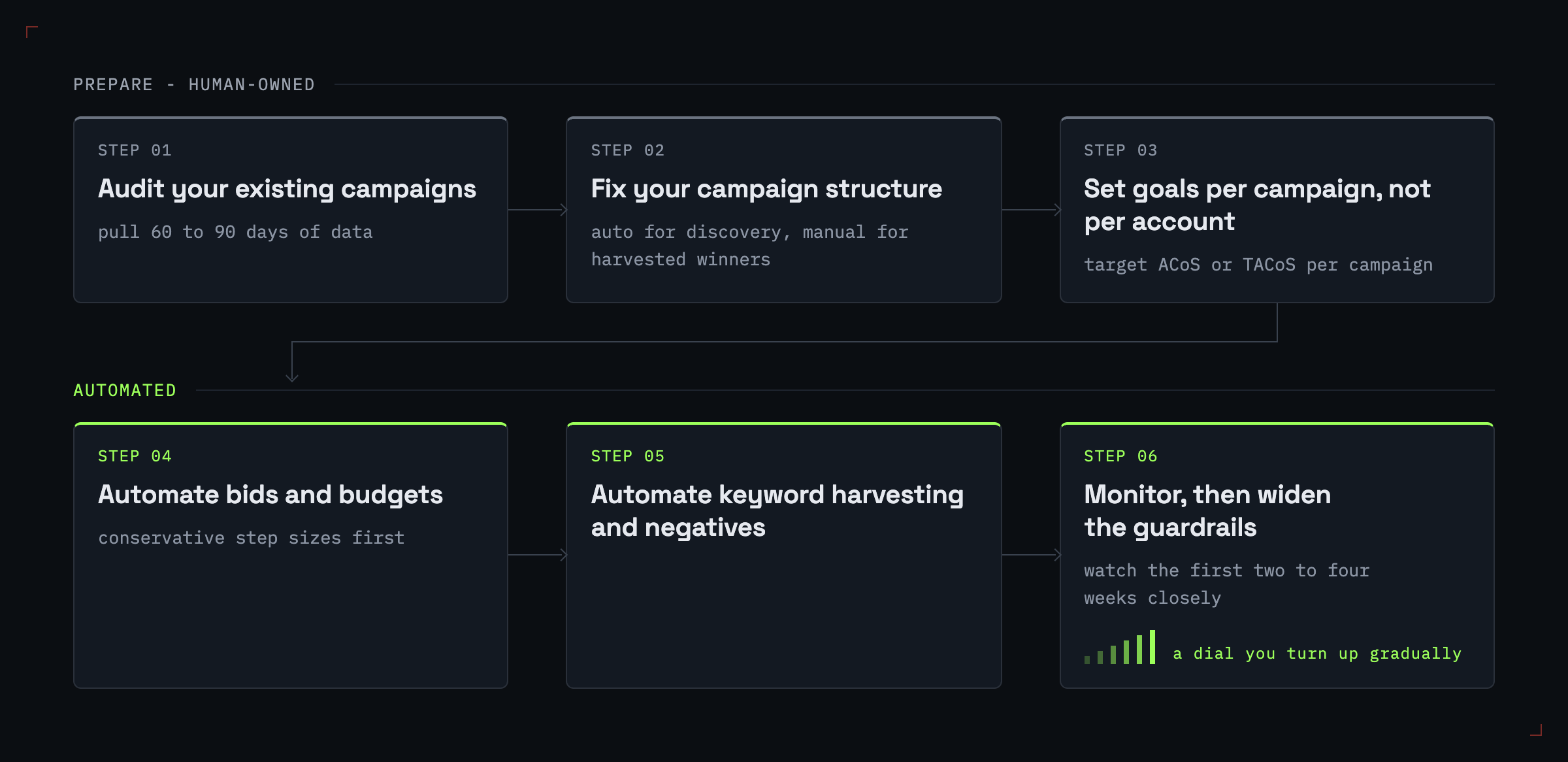
How to Set Up Amazon PPC Automation: A Step-by-Step Workflow
You don't automate a mess; you automate a structure. Rushing to switch on rules before your campaigns are organized just lets the software make bad decisions faster. Here's an order that works in practice.
1. Audit your existing campaigns. Before automating anything, pull 60 to 90 days of data and find what's actually happening: which campaigns convert, which search terms drive sales, where ACoS is out of line, and which ASINs have enough history to optimize. You can't set sane thresholds without a baseline.
2. Fix your campaign structure. Automation needs clean inputs. Separate auto campaigns (for discovery) from manual campaigns (for harvested winners), group ASINs that share a margin profile, and make sure each campaign has a single clear job. A poorly structured account produces poorly automated results no matter how good the tool is.
3. Set goals per campaign, not per account. Assign a target ACoS or TACoS to each campaign based on its role. A launch campaign tolerates a higher ACoS to buy rank; a profitability campaign on a mature product does not. One account-wide target is the most common setup mistake.
4. Automate bids and budgets. Turn on bid rules or goal-based optimization with conservative step sizes first. Start with a tight lookback window only on high-volume campaigns, and leave low-data campaigns on wider windows or manual control until they earn enough history.
5. Automate keyword harvesting and negatives. Let the tool pull converting search terms into exact-match campaigns and add non-converting terms as negatives. Review the first few cycles by hand to confirm the harvesting logic matches your intent.
6. Monitor, then widen the guardrails. Watch the first two to four weeks closely. Check that automated changes track with the search term report and your margin reality, then gradually loosen the constraints as the system proves itself. Automation works better as a dial you turn up gradually than as a switch you flip once.
Common Amazon PPC Automation Mistakes to Avoid
Automation amplifies whatever logic you give it, including the bad logic. These are the failure modes that show up most often.
Pausing top keywords on thin data. An overzealous rule that pauses any keyword above a target ACoS will eventually pause a keyword that was simply having a slow week, often one that drives strong organic rank. Always pair ACoS rules with a minimum-clicks or minimum-spend threshold so the tool doesn't act on noise.
Automating a poorly structured account. If your auto and manual campaigns overlap, or one campaign mixes high-margin and low-margin ASINs, automation will optimize toward an average that's wrong for every product in it. Structure first, automate second.
Treating every SKU the same. Per-SKU customization matters. A bid rule tuned for a $12 impulse buy is wrong for a $400 considered purchase with a long research cycle. One-size-fits-all thresholds quietly waste spend on both ends.
Ignoring algorithm and policy updates. Amazon changes placements, reporting, and ad products regularly. The recent rename of Sponsored Display into the broader display ads offering is a good example: tooling and tactics that assumed the old structure need revisiting. Set yourself a quarterly reminder to confirm your automation still maps to how the platform actually works.
Forgetting Vendor Central nuances. Vendor and Seller accounts don't behave identically, and a rule set built for one can misfire on the other. Retail media data, stockouts, Buy Box ownership, organic rank, promo calendars, and inventory availability can all break an otherwise sensible automation rule, and vendor accounts surface these signals differently than seller accounts. If you run both, validate your automation separately for each.
Amazon PPC Automation Tools (and Where Cross-Platform Fits)
The Amazon PPC automation tool market splits into two camps, and picking the wrong camp for your situation can waste money no matter how good the individual tool is.
The first camp is Amazon-specialist software: Helium 10, Sellics, Perpetua, Pacvue, and Scale Insights, among others. These are purpose-built for Amazon sellers, and they go deep: Vendor Central retail analytics, Amazon Marketing Cloud (AMC) audiences, FBA-aware tooling, and dashboards designed around Seller Central's quirks. If Amazon is your only channel, a specialist is almost always the right call, and nothing below argues otherwise.
The second camp is cross-platform operators, which treat Amazon as one channel among many rather than the whole business. This is where we fit. We unify ad management across 27 platforms, including Amazon Sponsored Ads and Amazon DSP alongside Google, Meta, LinkedIn, Microsoft, Reddit, and X, through a single MCP and REST interface. Autonomous agents can execute bid and budget changes rather than just recommending them, while multi-touch attribution measures impact across channels instead of inside a single platform's silo.
Two caveats. First, pricing is credit-based: SOLO is $20 per month or $200 per year, SCALE is $500 per month or $5,000 per year, and CUSTOM is sales-led. SOLO includes $20 in claimable credits each month, and SCALE includes $500 in claimable credits each month; customers actively claim the monthly credit in the billing portal. Second, we are breadth-first: for deep Amazon-only features like AMC dashboards, FBA-specific analytics, and Vendor Central retail reporting, specialist tools may still be the better fit. That's the trade-off, and it's worth naming plainly. Review Synter's current security controls before granting write access.
| Tool | Automation Type | Platform Scope | Best For |
|---|---|---|---|
| Helium 10 | Rule-based + AI bidding | Amazon-only | Sellers who want a full Amazon toolkit (research to PPC) |
| Perpetua | Goal-based AI | Amazon-first (plus retail media) | Amazon-focused brands wanting hands-off ACoS targeting |
| Pacvue | Rule-based + AI, enterprise | Amazon + retail media | Large brands and agencies managing retail media at scale |
| Scale Insights | Rule-based automation | Amazon-only | Sellers who want granular, transparent rule control |
| Synter | Autonomous AI execution | Cross-platform (27 channels, including Amazon) | Teams running Amazon alongside other paid-media channels |
Pricing across these tools changes often, and several specialists bill as a percentage of ad spend, so confirm current terms before you commit. If you want the wider view beyond Amazon, our roundup of broader PPC automation tools across platforms compares the cross-platform options, and our look at how to automate Amazon ads alongside every other channel goes deeper on the multi-channel operating model.
Frequently Asked Questions
What does Amazon PPC automation do? It handles the repetitive parts of running Amazon ads: adjusting bids toward a target ACoS, harvesting converting search terms into new keywords, adding non-converting terms as negatives, and reallocating budget across campaigns, all on a schedule or in near-real time rather than by hand.
Is Amazon PPC automation worth it? For accounts with more than a handful of SKUs, usually yes. The break-even point is when the volume of daily bid, keyword, and budget decisions exceeds the time you can give them. Small, simple accounts can often be managed manually without losing much.
What's the best Amazon PPC automation tool? There's no single best tool, just a best fit for your channel footprint. If Amazon is your only channel, an Amazon specialist like Helium 10, Perpetua, or Pacvue is purpose-built for it. If you run Amazon alongside Google, Meta, and other channels, a cross-platform operator like Synter can consolidate those channels in one place.
Does automation replace a PPC manager? No. Automation handles execution; the operator still owns strategy: which products to push, what ACoS targets make business sense, how to read a sales dip, and when to override the rules. The job shifts from data entry to decision-making.
Can I automate Amazon DSP? Amazon DSP is an omnichannel programmatic solution, and some specialist and cross-platform tools can manage and automate parts of it through Amazon's advertising APIs or managed-service partners, though access, permissions, and eligibility vary by advertiser. DSP automation is generally more advanced than Sponsored Products automation and is often gated to higher tiers or managed-service arrangements rather than available to every advertiser the same way.
Conclusion
Amazon PPC automation isn't really about handing the keys to a robot, or at least it shouldn't be; the point is handing off the repetitive bid, budget, and keyword work so you can spend your time on the decisions that actually move the business. Start by auditing and structuring your account, set goals per campaign, automate conservatively, and widen the guardrails only as the system earns trust. And pick a tool that matches your channel footprint: a specialist if Amazon is your whole world, a cross-platform operator if it isn't.
If Google, Meta, and other channels make up most of your paid media alongside Amazon, Synter lets you automate them from one operator, with autonomous agents that execute bid and budget changes and attribution that spans channels rather than living inside a single one. Review the current plans and map the connected accounts you want the workflow to manage.