You typed a product URL into a tool, waited ninety seconds, and got back a slick 16:9 video. Then the media plan caught up with you. TikTok wants 9:16, Meta wants 4:5 in the Facebook feed and 9:16 in Reels, and YouTube wants something that still lands as a 6-second bumper. Generating the clip was the easy part. The grind is turning one master into the dozen platform-ready cuts your channels actually accept, then getting them live without burning a week on exports. This guide walks you through an AI video advertisement generator end to end: from a prompt to a script to a set of formats that publish across the channels you run, plus how to measure what the video did once it's running.
What Is an AI Video Advertisement Generator?
An AI video advertisement generator is software that turns a text prompt, product URL, or short brief into a finished video ad, handling the script, voiceover, visuals, and editing automatically. Most tools use text-to-video models to render scenes, generate a voiceover from the script, and assemble captions and music into a ready-to-run clip, so you can produce a draft ad without a camera, an editor, or a studio.
That definition stretches across a wide range of products, and the differences start to matter the moment you're buying media. Some generators specialize in AI avatars and user-generated-content style spokesperson videos. Others render fully synthetic product scenes from a prompt. A smaller group treats generation as one step inside a larger workflow that also formats and ships the ad. The category you pick changes what happens after the render, which is where most of the actual work hides.
Why One Video Almost Never Works Across Every Platform
Most teams hit the same trap: the generator hands you a clean master, you upload it to Meta, and the preview crops your logo clean out of frame. Every platform has its own canvas, its own duration limits, and its own validation rules, and a single export rarely satisfies more than one of them at a time. A 16:9 hero cut that looks sharp in a YouTube in-stream slot turns into a letterboxed postage stamp in a vertical TikTok feed, black bars and all.
Aspect ratio is the most visible mismatch, but it isn't the only one. Durations are capped differently per placement, captions have to be burned in for sound-off feeds, and each ad network runs its own technical validation before your creative is even eligible to serve. The Interactive Advertising Bureau maintains cross-screen video ad format specifications as industry guidance, not a substitute for each platform's own upload requirements, precisely because there is no single shape that works everywhere.
Aspect ratios and durations by platform
The table below maps the common video formats to where they run, with a link to each platform's own current spec page. Treat it as a launch checklist, and confirm against the live docs before you ship, since placements shift by objective, region, and inventory type.
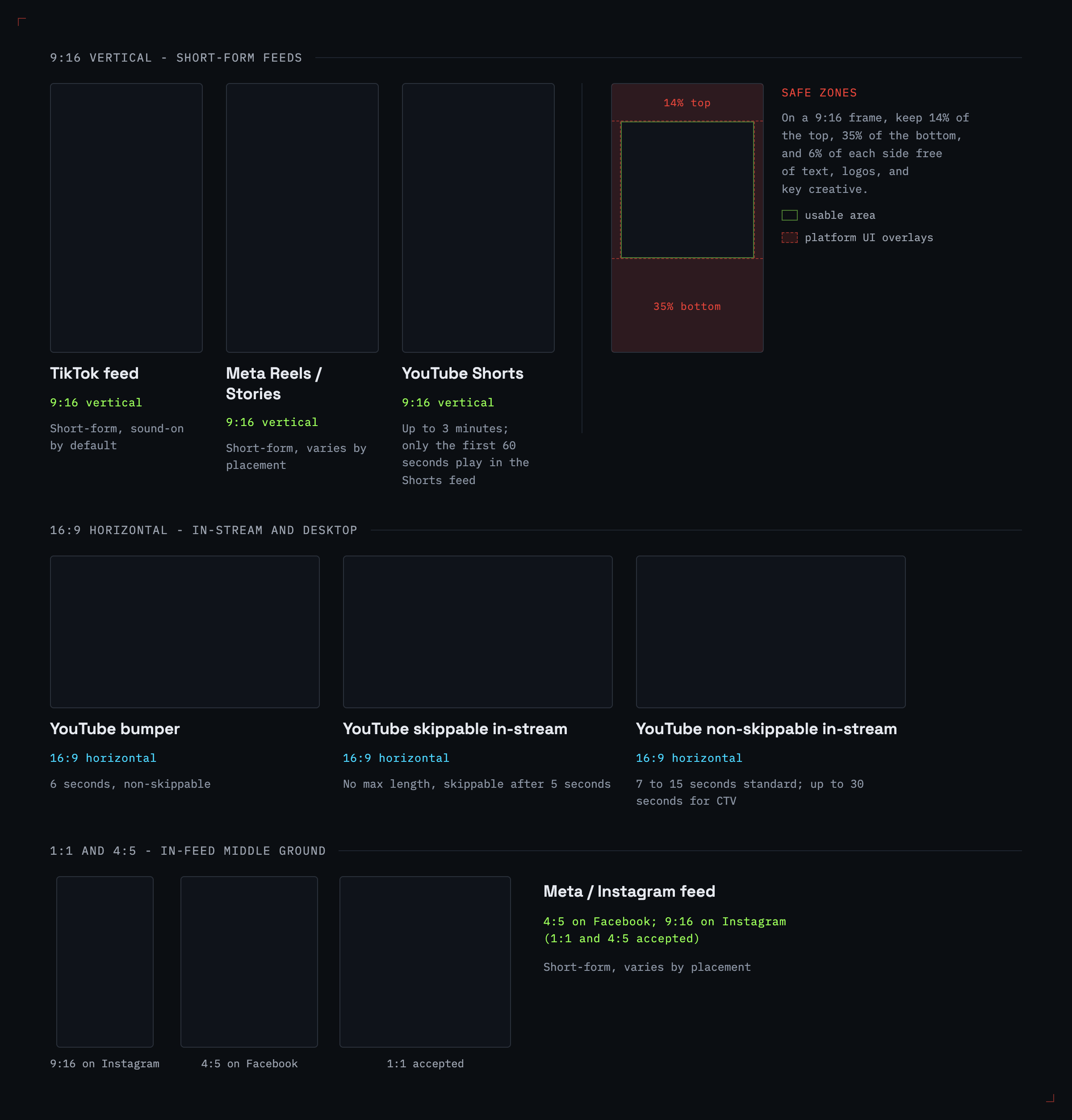
| Platform/placement | Aspect ratio | Typical duration |
|---|---|---|
| TikTok feed | 9:16 vertical | Short-form, sound-on by default |
| Meta Reels / Stories | 9:16 vertical | Short-form, varies by placement |
| Meta feed placements | 4:5 or 1:1 commonly used; confirm the selected placement's live spec | Short-form, varies by placement |
| YouTube Shorts | 9:16 vertical | Up to 3 minutes; only the first 60 seconds play in the Shorts feed |
| YouTube bumper | 16:9 horizontal | 6 seconds, non-skippable |
| YouTube skippable in-stream | 16:9 horizontal | No max length, skippable after 5 seconds |
| YouTube non-skippable in-stream | 16:9 horizontal | 7 to 15 seconds standard; up to 30 seconds for CTV |
Two patterns fall out of this. Vertical 9:16 covers the short-form feeds that own mobile attention, and Meta runs that exact full-screen ratio in Stories and Reels. Horizontal 16:9 covers YouTube in-stream and most desktop placements, where Google's own video ad formats run from a 6-second bumper to a 15-second standard non-skippable spot, or up to 30 seconds for non-skippable ads on connected TV. Square 1:1 and vertical 4:5 sit in the middle for in-feed slots, since Meta's Instagram feed accepts those non-9:16 ratios too. Protect a safe zone for logos, captions, and calls to action on any 9:16 cut, since Meta's Stories and Reels interface overlays profile info, captions, and action buttons near the top and bottom of the frame, and text or logos placed there routinely get covered. For Stories and Reels, Meta's guidance is to keep roughly 14% of the top, 35% of the bottom, and 6% of each side free of text, logos, and other key creative elements. Skippable in-stream is the flexible one: no hard max length, and viewers get the option to skip after five seconds, so your hook has to land fast. Generate one ratio, and you've likely locked yourself out of much of your inventory.
Transcoding, file specs, and validation requirements
Beyond shape and length, every platform enforces file-level rules: container format, codec, maximum file size, frame rate, and bitrate. A video that uploads cleanly to one network gets bounced by another over nothing more than an unsupported codec or an oversized file. Captions pile on another layer, because most feed video autoplays muted, so a clip without burned-in or platform-native captions loses its message in the first second of silence.
This is the unglamorous middle of the job, and it's the part an end-to-end tool can absorb. The same reformatting tax shows up across paid social, search, and display, which is why teams running cross-channel advertising platforms feel it the hardest. Before you publish, run every cut through a quick QA pass:
- Aspect ratio and safe zones for the placement
- Captions burned in or uploaded natively
- Claims, pricing, and offers matched to what's live on the landing page
- Logo and text cropping at the final crop
- Accessibility, including contrast and caption accuracy
- Audio rights and music licensing
- File size, codec, and bitrate against the platform's spec
- Platform ad-policy review status before the campaign goes live
How to Generate AI Video Ads, Step by Step
The workflow below holds across most generators, even when the buttons carry different names. Four steps move you from an input to a set of platform-ready cuts.
Step 1: Start from a product URL, prompt, or brief
Give the tool something to work from. A product URL lets the generator scrape your imagery, pricing, and value props and build a script around them. A text prompt earns its keep when you have a specific concept in mind, like a fifteen-second demo of a water bottle keeping ice frozen on a hot beach. A brief sits between the two: brand guidelines and a hook in hand, but the tool drafts the structure. The richer your input, the less you'll fix later.
Step 2: Generate script, voiceover, and visuals
Now the model does its heaviest lifting, drafting a script, rendering or selecting visuals, and producing a voiceover. Script-to-copy alignment matters more than it looks: the on-screen captions, the voiceover, and the ad's text fields should reinforce one message, not three competing ones. Tools that pair video generation with platform-aware copy help here, because the same engine that drafts your headline can match each network's character limits. If you're sharpening the words themselves, the same principles in AI ad copy generation carry straight over to video scripts.
Step 3: Edit scene by scene and add captions/music
First drafts almost never ship as-is. Trim the dead air, swap the weak scene, tighten the hook so it lands inside the first two seconds, and add captions for muted playback. Music sets the pace, so match the track to the cut instead of dropping a generic bed under everything. Keep one master edit that's "correct," then branch your platform variants from it. Editing scene by scene rather than re-rendering the whole video keeps your changes cheap and your message consistent across cuts.
Step 4: Auto-format and publish to every platform
This is the step that separates a video maker from an ad operator. Once the master is approved, it needs to become a 9:16 cut, a 1:1, a 4:5, and a 16:9, each inside the right duration and file spec, then upload to the right account. Doing that by hand is where the afternoon vanishes. Tools with an auto-resize step generate the variants for you. The Synter Creative Engine generates the underlying video with Google Veo, then automatically produces 1:1, 4:5, 9:16, and 16:9 variants for Google Display, Meta, LinkedIn, TikTok, and Reddit, so the formatting step that usually eats hours collapses into the render itself.
Choosing an AI Video Ad Generator: Creators vs. Ad Operators
Tools in this space split into two camps, and the right pick depends on which part hurts more: making the video or shipping it. Dedicated makers like Creatify, InVideo, Arcads, and HeyGen focus on the creative itself. They offer deep avatar and UGC libraries, lip-sync, and a range of spokesperson styles, which fits teams whose bottleneck is producing volume from human-looking actors. Most stop at export: you get a file, and the formatting, uploading, and optimizing land back on your plate, though some offer resize helpers or platform-specific templates that cover part of the gap.
Ad operators treat the video as one input into a campaign. They generate, then format, publish, and measure. The table frames the trade-off.
| Tool type | What it makes | Per-platform formatting | Publishes & optimizes across platforms | Best for |
|---|---|---|---|---|
| Avatar / UGC makers | Spokesperson and UGC-style video, deep avatar libraries | Manual export per ratio | No, stops at file export | Teams whose bottleneck is creative volume |
| General AI video tools | Text-to-video scenes, templates | Some offer resize | Rarely | Quick one-off concepts |
| Synter (ad operator) | Veo video, Imagen 4 images, GPT copy | Auto-Resize to 1:1, 4:5, 9:16, 16:9 | Publishes across connected platforms; video variants for Google Display, Meta, LinkedIn, TikTok, and Reddit | Teams shipping paid video to many channels |
The trade-off is real. If you need a hundred avatar variations of a talking-head testimonial, a dedicated maker wins on raw library depth, and there's a reason those tools rank for the head term. We aren't competing on avatar count. Our edge is the end-to-end path: create, auto-format, publish, and optimize inside one agent instead of four tools stitched together with manual handoffs. For a closer look at the creative side on its own, our roundup of AI ad creative generation tools compares the makers directly.
From Generated Video to Live Campaign on Every Platform
A rendered video is a cost until it's running and measured. The last mile, getting the ad live across accounts and then learning from it, is where an ad operator earns its name.
Publish across connected platforms and placements, wherever they're supported. Instead of logging into five ad managers and uploading variants by hand, a unified layer routes the right cut to the right placement. We connect through a unified MCP and REST interface across 27 ad platforms, so the 9:16 lands in TikTok and Reels while the 16:9 goes to YouTube, all from one workflow.
Let the agent optimize after launch. This is the half of the job most creative-only tools don't touch. Our autonomous execution adjusts bids on near-real-time performance data, pauses underperformers when CPA exceeds your thresholds, reallocates budget across platforms based on validated performance signals, and scales winning audiences within the guardrails you set.
Measure across the whole journey, not the last click. A video ad rarely closes the sale on its own, so crediting its value to the final touch sells it short. Our multi-touch attribution supports first-click, last-click, linear, time-decay, position-based, and custom-weighted models, which lets you see how an awareness-stage TikTok video contributed credit toward a conversion that closed weeks later on search. Make the video, ship the video, then prove what it did.
Frequently Asked Questions
How do I make an AI video advertisement? Start from a product URL, prompt, or brief; let the generator draft the script, voiceover, and visuals; edit scene by scene; then format the master into each platform's aspect ratio and duration before publishing. Tools that fold generation, auto-formatting, and publishing into one workflow can compress those last two steps into much less work.
Is there a 100% free AI video generator? Several tools offer free tiers, but they usually cap renders, watermark the output, or limit resolution. For paid media, the cost that bites isn't the render fee; it's the hours spent reformatting and shipping. Weigh free generation against the manual work it leaves on your desk.
Which AI ad generator is best? There's no single winner, because the tools optimize for different jobs. If your bottleneck is producing avatar or UGC video at volume, a dedicated maker fits better. If it's shipping and optimizing paid video across many channels, an ad operator that formats and publishes for you saves more total time.
Is AI advertising legal? Running ads built with AI tools is generally legal, but you're still on the hook for claims, voice and likeness rights, music licensing, stock or source asset rights, AI-disclosure rules, and substantiation for product claims in your creative. Regulated categories carry extra ad-policy rules on top of that. Review AI-generated output against each platform's ad policies and your local advertising rules before you launch.
Do I need to film anything? No. A text-to-video generator renders scenes from a prompt and produces a synthetic voiceover, so you can build a complete ad without a camera, an actor, or a studio. Many brands still need approved product imagery, legal packaging and claims, real demos, or licensed UGC and human-shot footage to keep the ad trustworthy and accurate, so you'll still want to review the output for brand fit and factual accuracy.
Conclusion
Generating an AI video ad stopped being the hard part. The work that decides whether the video performs is everything after the render: cutting it to 9:16, 1:1, 4:5, and 16:9, clearing each platform's file and duration rules, publishing to the right accounts, and measuring its real contribution across the journey. Treat generation as step one, not the finish line.
If you'd rather handle the whole path in one place, Synter generates video ads and ships them across 27 platforms with auto-resizing, autonomous optimization, and multi-touch attribution built in. Explore current plans to run the workflow end to end.