Today we're releasing the Synter MCP Server — an open-source integration that brings your ad accounts directly into Claude Desktop, ChatGPT, Amp, and any AI agent that supports the Model Context Protocol. No more tab-switching. No more copy-pasting data. Just ask.
The Problem: Your AI Can't See Your Ads
AI assistants are getting incredibly good at strategy, analysis, and creative work. But there's a problem: they're blind to your actual advertising data.
Want Claude to analyze your Google Ads performance? You have to export a CSV, upload it, and explain the columns. Want ChatGPT to suggest budget changes? You need to manually type out your current spend. This friction kills the magic.
The Solution: MCP — A Secure Bridge to Your Data
The Model Context Protocol (MCP) is an open standard that lets AI agents securely connect to external tools and data sources. Think of it as OAuth for AI — your agent gets scoped access to exactly what it needs, nothing more.
Supported Platforms
See It In Action
Watch how Synter transforms the way you manage ads:
One Prompt to Launch
Type a single sentence describing your campaign. Synter handles the rest — targeting, bidding, ad copy, and creative.
AI Builds Your Ads
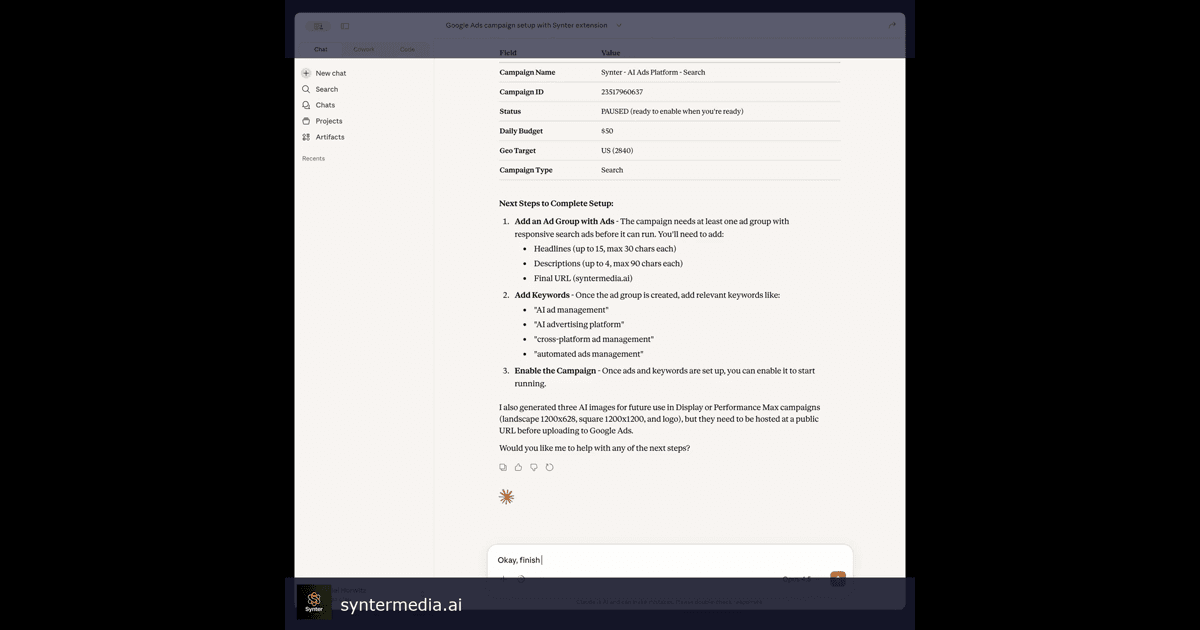
Watch the AI generate headlines, descriptions, and responsive search ads optimized for your keywords.
Campaign Live in 60 Seconds
From idea to live campaign in under a minute. Synter creates the campaign, ad group, ads, and keywords.
Pull All Campaigns
Ask for your campaign data and get a clean summary of performance across all your accounts.
What You Can Do
1. Pull Real-Time Performance Data
Ask your AI agent natural questions about your campaigns:
“How did my Google Ads perform last week? Which campaigns have the best ROAS?”
2. Manage Campaigns with Natural Language
Stop clicking through endless menus. Just say what you want:
“Pause the Brand - Display campaign. It's burning budget with no conversions.”
3. Spy on Competitors with Ad Libraries
Synter can pull ads from Meta Ad Library, Google Ads Transparency Center, and Reddit Ads:
“Show me what ads Ridge Wallet is running on Meta right now.”
4. Create Ads Inspired by Top Performers
Synter doesn't just show you competitor ads — it can create new ads inspired by what's working:
“Analyze the top DTC brands in the fitness space. Create 5 ad variations for my protein powder brand using their best creative patterns.”
Security First
Ad accounts are sensitive. Synter's MCP server is built with security as the foundation:
- API Key Authentication: Keys are hashed with SHA-256 — we never store plaintext credentials.
- OAuth Token Management: Platform tokens are managed through Nango with automatic refresh.
- Read-Only by Default: Destructive operations require explicit confirmation.
- Open Source: The entire MCP server is open source on GitHub. Audit it yourself.
Getting Started
Setup takes about 2 minutes:
1. Install the package
npm install @synterai/mcp-server2. Add to your Claude Desktop config
{
  "mcpServers": {
    "synter": {
      "command": "npx",
      "args": ["-y", "@synterai/mcp-server"],
      "env": {
        "SYNTER_API_KEY": "your-api-key"
      }
    }
  }
}
Get your API key at syntermedia.ai/developer (requires an active SOLO, SCALE, or CUSTOM subscription and connected ad accounts).
Works With Your Favorite AI
- Claude Desktop — Anthropic's native desktop app
- Amp — Sourcegraph's AI coding agent
- ChatGPT — Via custom GPT with MCP support
- Cursor — The AI-first code editor
- Any MCP-compatible agent — The protocol is open
What's Next
This is just the beginning. We're actively adding:
- Automated A/B testing: Let your AI run experiments and learn what works
- Cross-platform optimization: Shift budgets between Google and Meta based on real-time performance
- Creative generation: Generate images and videos directly from your AI conversation
- Audience insights: Pull customer data from your CRM to inform targeting
Ready to get started?
Bring your ad accounts into your AI workflow today.
Questions? Reach out at joel@synterai.com.